
Name-Based Case Searches
The Bowie County District Clerk links the official Tyler case-search destination for district civil, family, felony, and County Court at Law matters. During the research check, the direct portal returned an HTTP 403 response. Its live name fields could not be observed, so no unverified controls are claimed here. A name search remains less exact than a cause-number search because spelling, initials, name changes, and similar names can widen or hide matches.
Use the smallest amount of personal data needed. Do not test a search with a Social Security number, driver-license number, or date of birth unless the official court route truly requires it for the user’s own matter. Note the court, URL, and search date. A blank result is only a report about that search at that time.
- Start from the District Clerk page so the vendor destination has an official county referral.
- Use the exact party name shown on a filed notice, then try a careful spelling variant if needed.
- Compare any result with the known court, filing period, case type, and cause number.
- Record what the index shows, then ask the clerk for a document or certified disposition when needed.
Bowie County Tyler Portal Limits
The District Clerk identifies the Tyler destination as “Bowie County Case Records Search,” yet the same county page warns that it does not allow document viewing. That distinction matters. An index may help identify a cause number, court, style, or status, while the pleading, order, judgment, or transcript remains outside the public screen.
The official District Clerk page documents the portal route and warning.
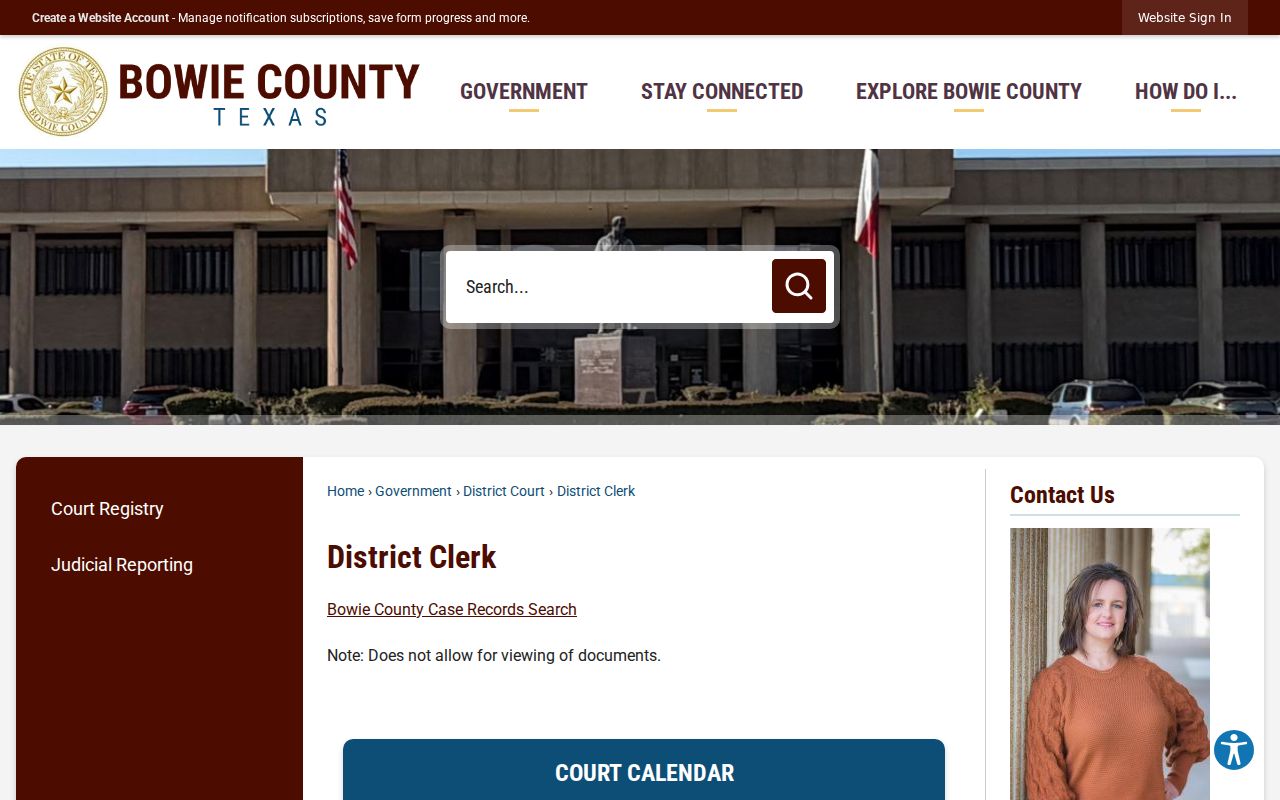
The source capture shows why a case locator and a document request must remain separate steps.
Portal limit: Treat a Tyler result as a locator, not as the complete Bowie County court record or a certified account of the case.
If the portal blocks access or omits the needed item, call the District Clerk at 903-628-6750 or use the clerk’s copy process. The office lists separate lines for civil filing, felony criminal, and misdemeanor criminal matters. Those numbers route record questions; staff cannot give legal advice.
Case Number Searches
A cause number is the best local key. The inspected criminal docket showed a pattern that includes a year, an offense or case sequence, and a court-related suffix. The research did not establish one safe fictional Bowie format, so preserve the real value exactly as printed instead of forcing it into a generic mask such as YYYY-XX-#####. Keep every letter, zero, hyphen, and suffix.
A police or agency number is not the same key. Neither is a municipal citation number, a County Clerk instrument number, or a federal case number. If a number fails, first ask which office created it. Then search through that custodian rather than stripping parts from the number.
Bowie County Search Fields Observed
Only fields directly seen in official sources should guide a Bowie County docket search. The county portal’s fields were not visible during the 403 response. The county calendar and statewide system were accessible enough to document their controls.
| Route | Observed fields or controls | Use |
|---|---|---|
| Bowie Tyler portal | No fields confirmed during access block | County-linked case locator |
| Bowie calendar | Start and end dates, phrase, past events, calendar selector, List, Week, Month | Hearing discovery |
| re:SearchTX | Cases, Filings, Text, Hearings, filters, export, saved searches | Statewide discovery layer |
Registration for re:SearchTX visibly asks for first name, last name, email, password, confirmation, and account type. General Public was an observed account choice. Registration fields are not case-search facts, and account access does not prove that every Bowie County filing is present.
Case Search Results Explained
A search result can describe a case without supplying the full record. Read each field by its narrow meaning. A setting marks a scheduled event, not proof that it occurred. A disposition should be checked against the clerk’s judgment or other official entry. A payment status belongs to a payment system and may not explain the court outcome.
| Cause number | The clerk’s case identifier, including all letters and suffixes. |
|---|---|
| Style or parties | The case caption; it does not state who prevailed. |
| Case type | A routing category such as criminal, civil, or family. |
| Setting | A date and stage scheduled on a court calendar. |
| Disposition | An outcome entry that should be verified in the source record. |
The county’s sample criminal PDF adds offense and jail-status columns. Jail status is a point-in-time calendar field, not a live custody record. Avoid republishing names or sensitive fields when the goal is simply to understand the docket.
When Bowie County Shows No Result
No result may point to the wrong court, a narrow date range, alternate spelling, a restricted case, incomplete statewide coverage, or a portal problem. It can also mean the record belongs to a JP clerk, municipal court, County Clerk, federal clerk, or bankruptcy court rather than the District Clerk.
Check the source and search date first. Try the exact cause number. Then verify court and date with the Bowie County calendar. If the case still does not appear, contact the likely custodian and ask for a specific index, disposition, or document. For federal matters, PACER and the Eastern District of Texas form a separate search lane.
Note: A negative online result is not proof that no Bowie County case exists.
Two Ways to Search: County and State
The local Tyler destination and re:SearchTX serve different roles. Begin locally for a known Bowie County matter. Use the statewide account-based tool as an added discovery route when the court is unclear or state coverage may help. Confirm all useful results with the court of record.
| re:SearchTX | Bowie County Tyler Portal |
|---|---|
| Statewide electronic access with coverage that remains system dependent | County-linked destination for local case discovery |
| Cases, Filings, Text, and Hearings tools described by the official guide | Live fields unconfirmed; county says documents cannot be viewed |
| Useful as a second route | Best starting point for a known local matter |
Bowie County Copies After Search
The online index is only the first step when the user needs a pleading, order, judgment, or certified disposition. A useful District Clerk request gives the cause number, court, document type, filing or hearing date, requester contact information, and purpose where requested. State whether a plain, electronic, certified, or exemplified copy is needed.
The clerk FAQ says payment is due before release and permits mailed requests with a check or money order. Phone and in-person paths are also described. Electronic copies up to ten pages are listed at $1, with added pages at $0.10 each; printed pages are $1 per page. The 2026 District Clerk schedule lists a $5 record search per name. Confirm the current total before ordering, especially for certification, redaction, or a large file.
Bowie County E-Filing Is Different
eFileTexas and electronic filing service providers transmit filings and service for parties. They are not the same as a public Bowie County docket search. The District Clerk reports that civil e-filing became mandatory in July 2015 and criminal e-filing in January 2019. A receipt proves a submission event, not that a public viewer now offers the document.
For self-represented filing help, the state offers a separate eFileTexas self-help route. For public access, return to the county portal, calendar, statewide search, or clerk request. Keeping those functions apart prevents a filing login from being mistaken for a public record account.
Which Cases Stay Restricted
A public calendar or index does not make every underlying page public. Juvenile, family, child-support, protective-order, sealed, expunged, and redacted material can have added limits. Texas Rule of Civil Procedure 76a supplies a sealing framework for court records, while Texas judicial records policy explains that Rule 12 governs judicial records other than ordinary case records in its scope.
The Texas Public Information Act is not an automatic path to a filed case document. Government Code section 552.0035 directs judiciary records questions to Supreme Court rules and other law. Ask the Bowie County clerk whether the exact record is releasable, needs redaction, is sealed, or must follow a set request method. If access is denied, request the controlling rule and review route in writing.